
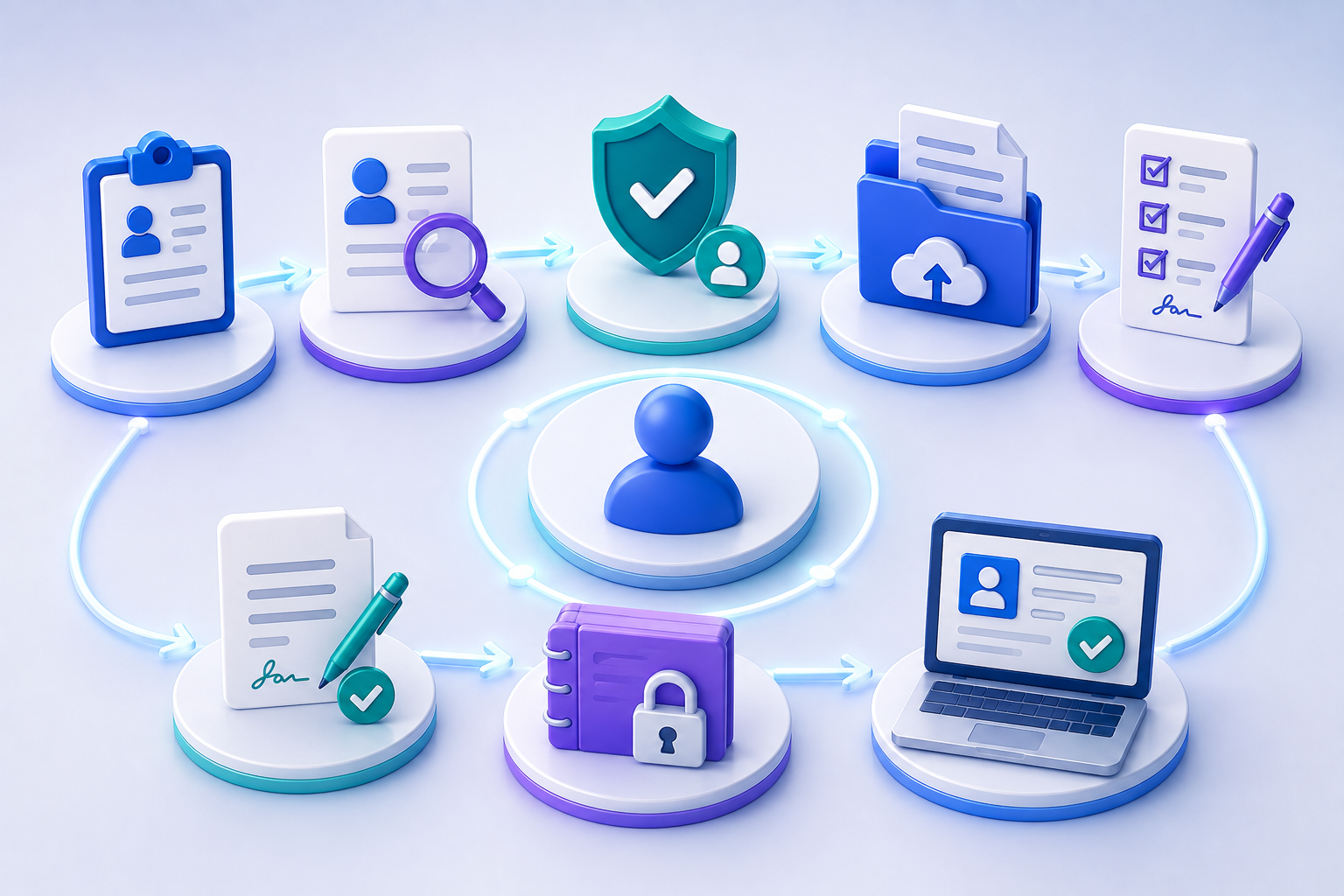

For recruiters, candidate onboarding is a whole journey — details, references, checks, declarations, contract and hand-off. Right to Work and DBS checks are components within it.
Quick answer
Candidate onboarding is the journey from application or offer to a compliant, placed worker. Done as one flow, it collects the candidate’s details, qualifications and references, runs the checks the role requires (ID, Right to Work, DBS and others), captures declarations, and generates the documents or contract for that role — with a full audit trail. Right to Work and DBS checks are components within candidate onboarding, not the whole process.
For recruitment agencies and employers, the moment a candidate is offered a role kicks off a scramble: collect their information, chase references, run Right to Work, arrange a DBS check where needed, capture declarations, issue the contract. Run manually across spreadsheets and email, it’s slow, error-prone and — increasingly — a compliance risk. As one industry checklist put it bluntly, manual spreadsheets don’t cut it at scale.[1]
The answer isn’t a faster ID check. It’s designing candidate onboarding as one configured journey where the checks are steps inside a broader flow.
Candidate onboarding as a single journey
Collect candidate details & documentsGather personal details, qualifications and supporting documents through a guided flow the candidate completes on their phone.
Request & track referencesAutomatically request references and chase them, tracking status so nothing stalls.
Run Right to Work checkscheckVerify the candidate’s right to work, matching the checking route to their status — with the Home Office audit-trail output captured correctly.
Run ID & DBS checks where requiredcheckConfirm identity and request the correct level of DBS check (Basic, Standard or Enhanced) for the role.
Capture declarationsCollect the declarations and consents the role and sector require.
Generate the contract & documentsUse the collected information to produce the right documents or contract for that specific role.
Compile & hand offAssemble a complete, auditable candidate file and return it to your ATS or back-office system.
The Right to Work, ID and DBS checks sit at steps three and four — they’re essential compliance components, but the journey is built around placing the candidate, not around the ID check.
Why recruiters need the whole journey
An ID/Right to Work check alone still leaves references, declarations, contract generation and hand-off as manual admin.
A complete candidate journey collects information once and carries it through to a signed contract and a clean audit trail — with the checks handled inside the flow.
The compliance detail that trips agencies up
Automating the trigger for a Right to Work check isn’t enough — the output has to be captured correctly. The Home Office audit-trail requirement is specific: the system must store the check result, the document type verified, the date of check and the provider used, linked to the candidate record. If a workflow fires the check but doesn’t record that output against the candidate, there’s a compliance gap that won’t be visible until an audit.[2]
From 1 October 2026, the Right to Work framework is intended to extend checks beyond conventional employment contracts to additional worker contracts and certain arrangements — so agencies managing flexible labour should confirm their journeys cover the broader group. Always verify current Home Office requirements before relying on any process.
Why speed and structure both matter
10–15 hrs
of onboarding admin per placement that automation can remove, per industry estimates
From April 2022
certified IDVT Right to Work checks permitted for eligible document types
1 platform
references, RTW, DBS, ID and documents in one journey vs scattered tools
Figures from the cited third-party sources; indicative — verify before quoting.[3]
Beyond time saved, structure protects placements. Document-expiry tracking (visas, DBS, certifications) with automated alerts prevents the classic failure: a check that lapsed on Friday and a candidate placed on Monday, turning a missed reminder into a client issue and agency liability.[1]
Key takeaway
Choose candidate-onboarding software by the whole journey — information, references, the checks the role needs, declarations, contract generation and hand-off — not by the Right to Work check alone. The check is one step; onboarding the candidate is the process.
Onboard candidates in one complete journey
OnBoardNow lets you design candidate onboarding around the role: collect details, qualifications and references, run ID, Right to Work and DBS where required, capture declarations, generate the contract, and return a structured file to your ATS.Book a demo →
Frequently asked questions
What is candidate onboarding?
The journey from application or offer to a compliant, placed worker — collecting details, qualifications and references, running the checks the role requires, capturing declarations, and generating the right documents or contract.
Is candidate onboarding just a Right to Work check?
No. Right to Work, ID and DBS checks are components within candidate onboarding. The full journey also gathers information and references, captures declarations, generates the contract and hands off to your systems.
What checks does candidate onboarding involve?
Depending on the role: ID verification, Right to Work, DBS (Basic, Standard or Enhanced), and reference checks. The journey includes only the checks that role requires.
How does automation help with Right to Work compliance?
It runs the check and, crucially, captures the required audit-trail output — result, document type, date and provider — against the candidate record, closing the gap that manual processes often miss.
Can a journey generate the contract?
Yes. A complete journey uses the information already collected to produce the appropriate documents or contract for that role, and can capture signatures within the same flow.
Leave a Reply